


Introducing 
BankUnited Lynx is evolving into BankUnited TreasurySuite, our enhanced digital banking platform designed to elevate your online banking experience. With a new name and a powerful set of upgraded features, BankUnited TreasurySuite delivers a more intuitive interface, expanded capabilities, and streamlined tools to help you manage your accounts with greater ease and efficiency. Explore what’s new, what to expect, and how to prepare for this exciting upgrade.
Explore EnhancementsExplore Enhancements


What's New! Designed to Help You Work Smarter
A new level of performance starts here. Our latest upgrade introduces powerful enhancements that boost speed, elevate efficiency, and unlock new possibilities. Dive into the upgraded features shaping the future of your workflow with BankUnited TreasurySuite.
BankUnited TreasurySuite is designed to help you work faster, stay informed, and manage your business with confidence.

Global Payments, Simplified
View exchange rates before submitting international wires for greater transparency and confidence before you commit.

Greater Payment & ACH Flexibility
Un-approve payments that have not been processed and handle a wider range of payments including Payroll and Tax Payments in one place, giving you more control.

Stronger Fraud Protection
Review and Approve Positive Pay exceptions directly from your mobile device for on-the-go convenience, helping to reduce risk and payment delays.

Faster Payments and Transfers
Send multiple payments at once and move funds across one or many accounts.
Training & Educational Resources

Your Upgrade Journey
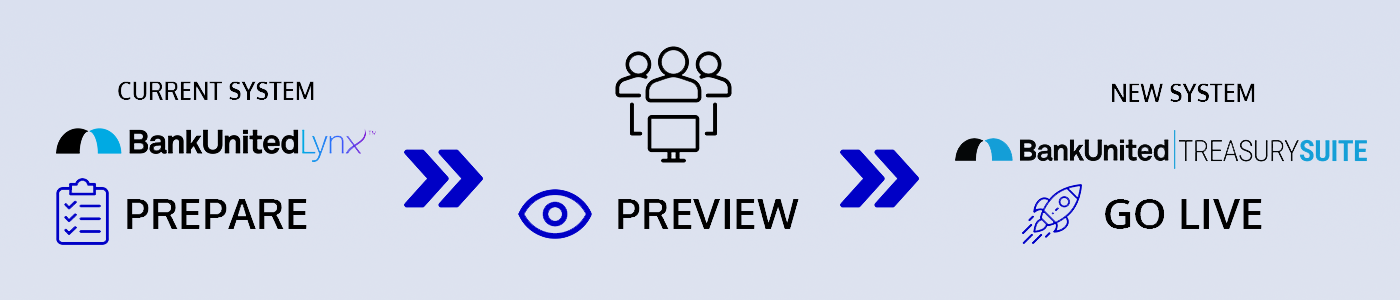
- Continue utilizing BankUnited Lynx to transact
- Complete the Preview Preparation Readiness Checklist
- Explore our BankUnited TreasurySuite Resource Page

- Continue utilizing BankUnited Lynx to transact
- Complete the Preview Period Readiness Checklist
- Explore our BankUnited TreasurySuite Resource Page
- Access BankUnited TreasurySuite in a test environment

- Begin utilizing BankUnited TreasurySuite to transact
- Complete the Go-live Readiness Checklist
- BankUnited Lynx will be read only and transacting will be disabled
Frequently Asked Questions
- Run reports in BankUnited TreasurySuiteTM and compare them to BankUnited Lynx.
- Identify missing or incorrect data and report them to the upgrade team for remediation and troubleshooting.
- Recreate any custom reports
- Recreate any file import maps
- Establish alert notifications for Positive Pay, ACH/Wire Imports if applicable.
- Review all ACH templates, and confirm any reoccurring schedules and effective payment dates
- Confirm payment templates are reapproved, and display ‘Approved’ in the status column instead of ‘Entered’ or 'Needs Repair'.
Clients are encouraged to complete the preview period readiness checklist prior to go-live.
BankUnited TreasurySuiteTM is a modern solution designed to provide you with even greater control, security, and efficiency for your cash management needs.
With this change, you’ll benefit from:
- Enhanced Security
- Improved retention of Balance and Transaction Reporting with up to 18 months of historical information.
- A new native mobile app with the ability to decision Check Positive Pay exception items
- Easier assignment of services and user permissions.
- One-to-many and many-to-one Account Transfers
We're Here to Support You
We’re here to support you before, during, and after the upgrade.

Dedicated Client Services and Concierge Support

Additional Support During Key Upgrade Phases
